
← 3thousand30 all use cases →
workflow guide · windows · updated May 27, 2026

How To Create A Photobook With AI For Gifting

Build a themed image batch, reject weak work hard, enhance the shortlist for print, and turn it into something a real person would actually want to hold, gift, or buy.

buy once windows workflow print-ready output giftable artifact

This is the workflow we use when we want an AI photobook that still feels human-directed. The point is not just image generation. The point is sequencing, rejection, print prep, and turning batches into a coherent object.

It works for Amazon KDP, Lulu, author copies, private gifts, and small print runs where ownership, cost control, and local file handling matter more than another subscription dashboard.

quick read

stack: BatchGen Image with AI + BatchEnhance Image

best for: gifts, KDP, Lulu, coffee-table books, author copies

dated cost snapshot: from about $20.48 plus print and shipping

>

products_used

>

public_artifact_example

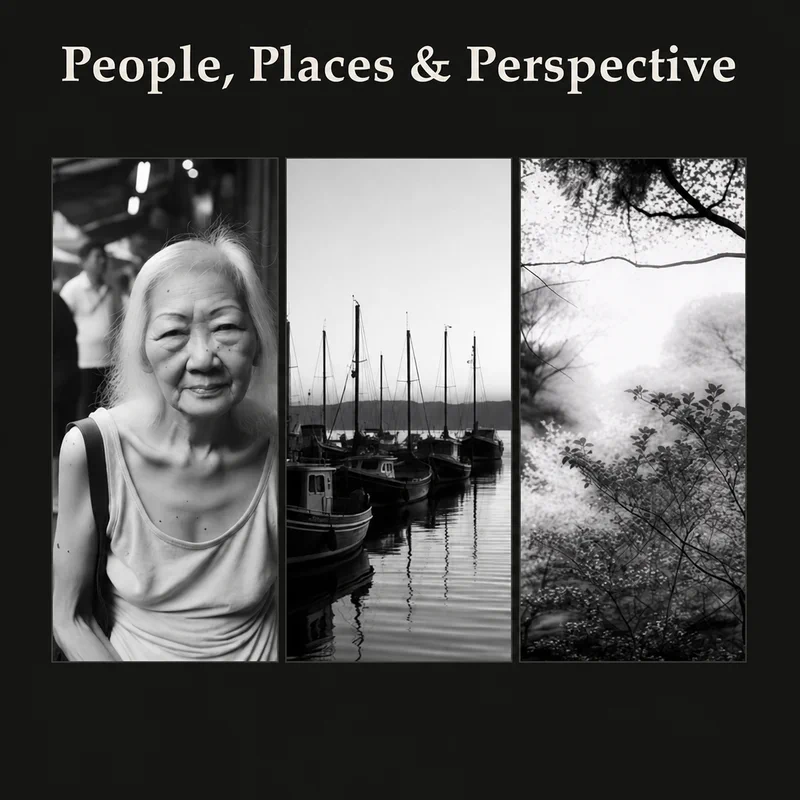
People, Places & Perspective matters because it is not a mockup. It is proof that a batch AI image workflow can become a physical artifact that people can gift, publish, and keep.

>

why_this_works

// a repeatable way to generate image sets around a theme // enough creative range that review and selection become meaningful // enough consistency that the book still feels like one object // print-ready enhancement before export // local file handling and one-time tool ownership // room for human judgment instead of one-prompt hype
>

the_workflow

01

Start with a theme that can carry a full book

Good themes are broader than a single prompt and narrower than a vague mood board: cities and memory, surreal travel diary, meditative landscapes, or visual metaphors around spirituality and reflection.

02

Build a topic list, not a one-image toy prompt

Plan chapter ideas, scene ideas, cover concepts, recurring motifs, and emotional shifts. This turns the process into a batch workflow instead of improvising one image at a time.

03

Generate more than you need

Inside BatchGen Image with AI, use a visual persona, reference images, and the template or aspect ratio that suits the book pages. Over-generation is not waste here. It is what gives taste something to work with.

04

Review hard, reject hard

Remove weak anatomy, weak composition, off-theme images, and visual repetitions that flatten the book. We also use an internal critic loop with Claude, but the final selection stays human.

05

Enhance the shortlist for print

BatchEnhance Image handles the print-prep stage: upscale batches, embed print-ready DPI metadata, sharpen when needed, and export cleaner files for physical output.

06

Assemble the book

Our internal PDF workflow handles cover placement, page order, and section flow. That public assembly tool is planned for release later in 2026, but the essential point is that the shortlist is already strong by this stage.

07

Publish, gift, or sell

From there you can publish on Amazon KDP, publish on Lulu, order author copies, gift the finished book privately, or turn the strongest spreads into posters or companion prints.

>

money_paths

A finished book is stronger proof-of-work than another abstract AI claim. Once the workflow exists, you can reuse it for gifts, author copies, coffee-table books, posters, Etsy printables, or a niche artifact line built around a consistent style.

// sell the finished book on Amazon KDP or Lulu // order author copies for events, gifts, or portfolio proof // turn selected pages into posters or themed printables // build a repeatable artifact line without monthly software rent
>

cost_snapshot

Date: May 27, 2026. Rough planning numbers only. Print and shipping are not included.

Provider and model Current reference cost Rough total for 100 images
Black Forest Labs FLUX.2 klein 9B from $0.015 per image about $1.50
Black Forest Labs FLUX.2 pro from $0.03 per image about $3.00
Google Gemini 2.5 Flash Image $0.039 per image about $3.90
OpenAI GPT Image 1.5 medium about $0.034 per image about $3.40
OpenAI GPT Image 1.5 high about $0.133 per image about $13.30
one-time tool ownership

Current site snapshot on May 27, 2026:

BatchGen Image with AI: $13.99

BatchEnhance Image: $4.99

about $18.98 once

first-run economics

Lower-cost first run with cheaper image generation: about $20.48 plus print and shipping.

Quality-forward first run at OpenAI medium: about $22.38 plus print and shipping.

If you already own the apps, reruns drop back to mostly AI generation plus print cost.

>

faq

Is this really a good gift idea?

Yes, especially when the final book feels deliberate instead of random. A physical book can work even for someone who is not impressed by AI as a concept, because they are reacting to the artifact itself.

Do I need to be a designer?

No, but you do need standards. Taste, selection, and sequencing matter more than pretending one magic prompt will do everything.

Is the workflow fully local?

The prep, enhancement, and saved outputs stay on your machine. If you use an external AI provider through BatchGen Image with AI, the prompt request goes to the provider you choose. We do not add a hidden cloud layer around that.

Why use a buy-once Windows app instead of an image SaaS?

Because the workflow is yours: no monthly subscription from us, choose your own model, pay the AI provider directly, keep the files on your machine, and re-run the workflow over time without software rent.

Which model did you use?

Flux was used in this workflow. Gemini was also tested. Claude was used in the internal critic loop. Human selection still decided the final book.

Can this also become a KDP or Lulu product?

Yes. That is one of the main reasons this workflow matters. The same batch AI image process can become a private gift, an author-copy project, or a sellable print artifact.

>

related_next_steps