skip to content
buy once Local PDF utility Windows

Batch eSign PDF

Sign a complete PDF folder locally with reusable visual signatures and a deliberate review step.

Batch eSign PDF is for repeating a clear signing step across similarly laid-out documents without uploading the files or touching the originals. Create a reusable visual signature, position it once, inspect the preview, then make separate signed copies of the complete folder. A compatible RSA certificate in the Windows certificate store can also be used for the app’s certificate-signing workflow.

what_it_does

A focused workflow, not a suite you have to rent.

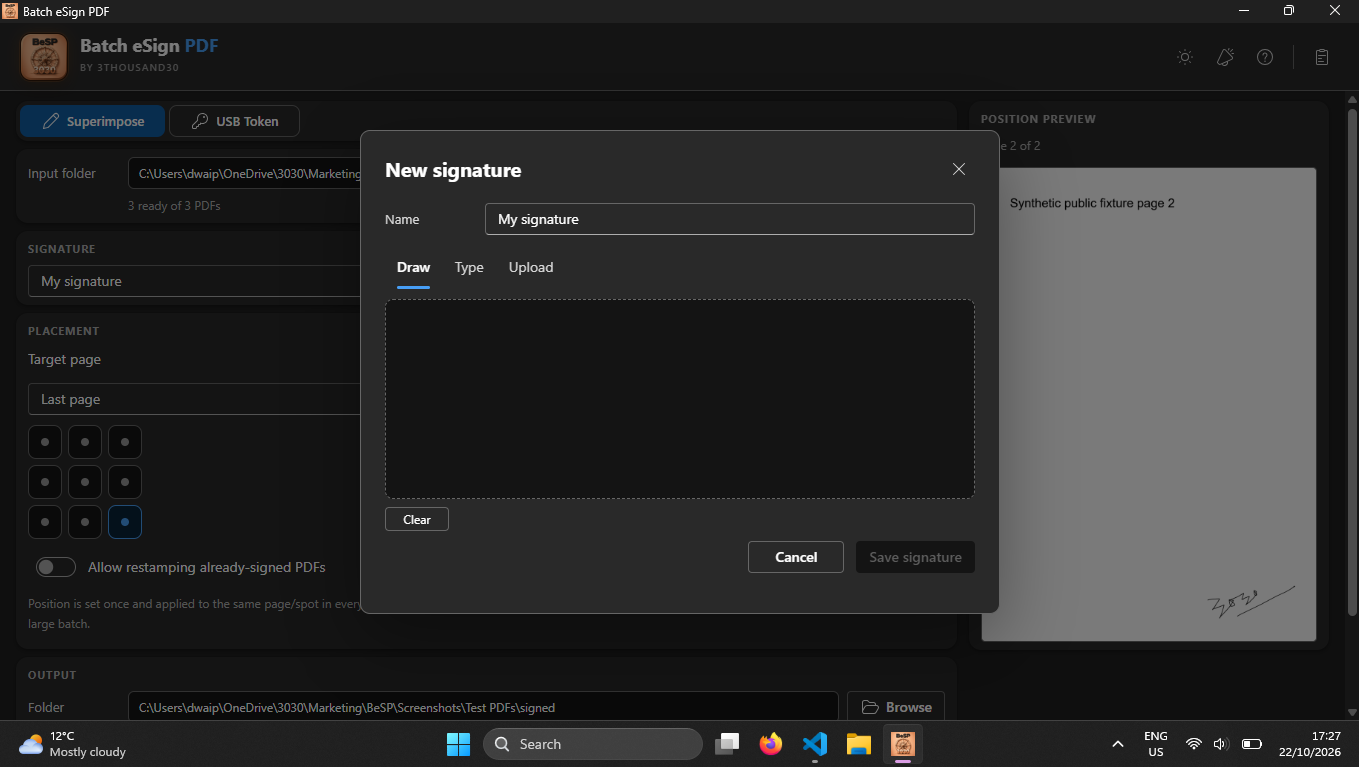
Draw, type, or upload a signature and save it as a reusable profile

Apply one visual signature consistently across a folder of similarly laid-out PDFs

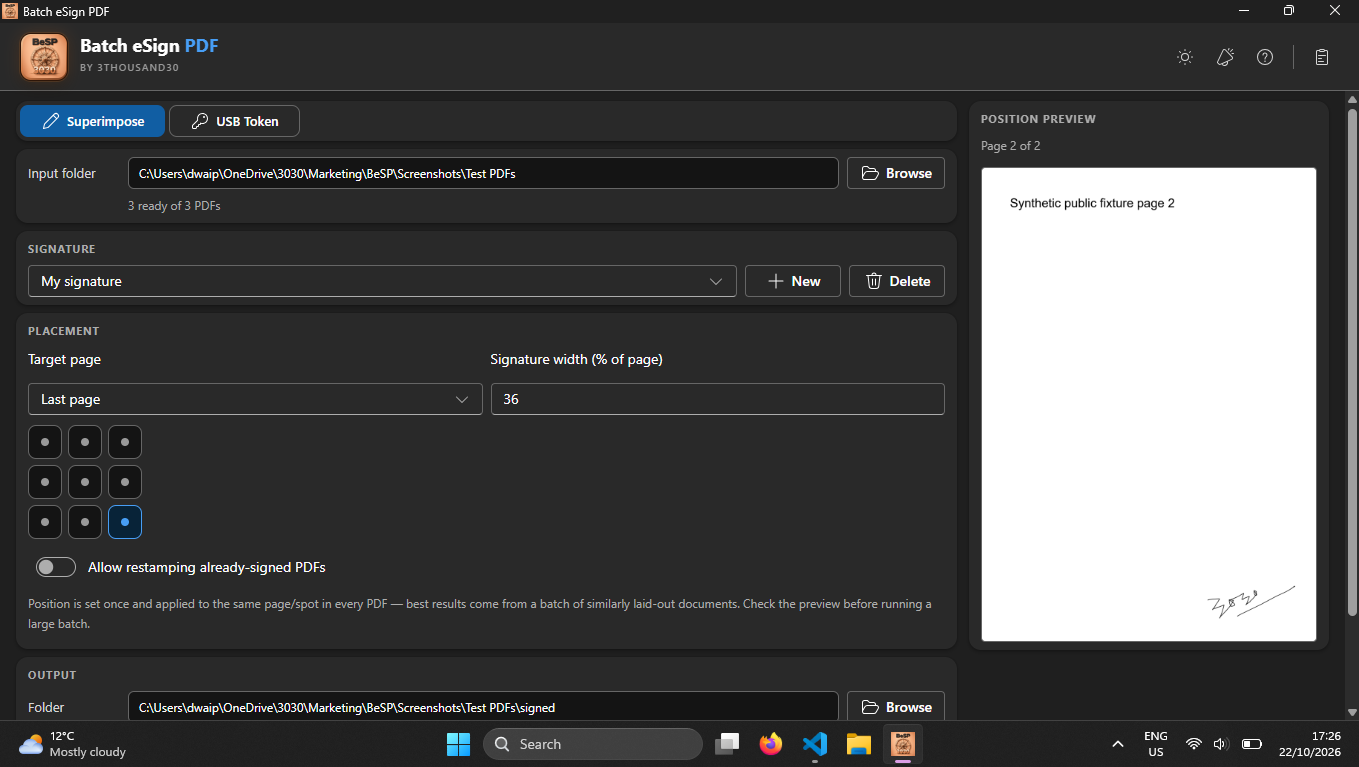
Choose page, anchor position, size, and fine offset before processing

Use the live placement preview to check a representative PDF first

Write safe signed copies to a separate folder with collision-safe names

Receive a signing-report.csv audit trail alongside every completed batch

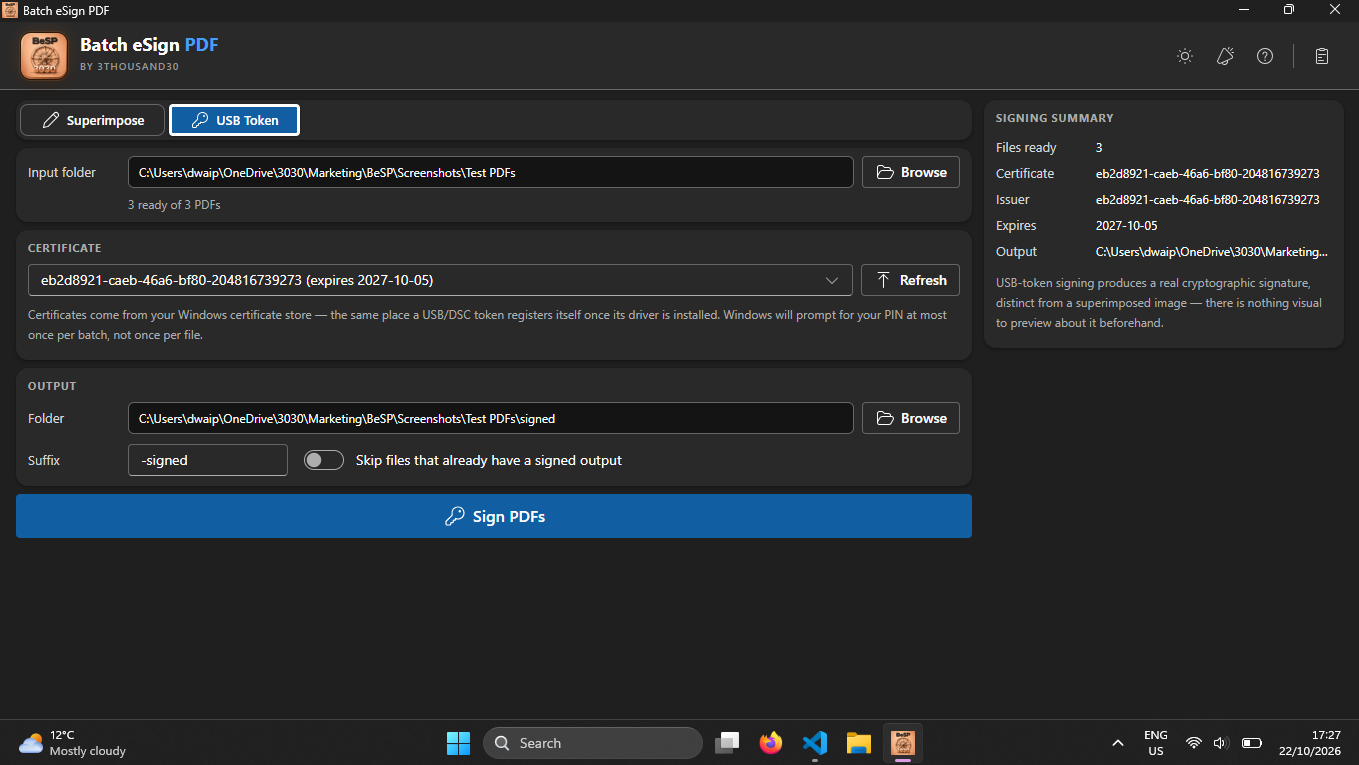
Use the compatible Windows RSA certificate workflow when a cryptographic signature is required

inside_the_app

See the actual Windows workflow

Batch eSign PDF placement controls and preview
Place a signature consistently across a PDF batch.
Create a reusable signature in Batch eSign PDF
Create a reusable signature by drawing, typing, or uploading it.
USB Token certificate-signing workflow in Batch eSign PDF
Choose a Windows certificate for digital PDF signing.

who_it_is_for

  • People applying a consistent approval or acknowledgement signature across PDF sets
  • Teams preparing review-ready or routine internal document copies
  • Anyone who wants local PDF handling instead of browser-based file uploads

privacy_and_control

Fully local · originals stay separate

PDF selection, signature creation, previewing, signing, reports, and output creation stay on the Windows PC. No account, document upload, analytics, or telemetry is required.

use_it_for

Practical workflows

all use cases →
workflow://UC-40 6 steps

PDF & file workflows

Apply Consistent Visual Signatures to PDF Batches

Create separate signed copies of similarly laid-out PDFs with one reviewed visual signature placement, while keeping the source documents local and unchanged.

BESP

faq

Straight answers

Are my originals changed?

No. Batch eSign PDF creates separate output copies and keeps source documents unchanged.

Is a visual signature the same as a digital certificate signature?

No. A drawn, typed, or image signature is a visible mark. Certificate signing is a separate cryptographic workflow that requires a compatible RSA certificate with an available private key in the Windows certificate store.

Does certificate signing add a trusted timestamp or long-term validation data?

No. If a timestamp or embedded revocation evidence is required for your legal, regulatory, or retention workflow, use a specialised signing process that provides it.

ready_when_you_are

Own Batch eSign PDF and keep the workflow.

US Store price: $3.75 (-25%), normally $5.00. Regional pricing may differ.

related_products

toolapp://bpp US Store price $3.74, 25% off the original $4.99
Batch Protect PDF logo

Local PDF utility

Batch Protect PDF

A local Windows batch PDF protector: one password locks a batch of PDFs with AES-256 so nobody without it can open the content, and Unprotect mode removes that protection again given the password.

pdffilesproductivity
// buy once view app →
toolapp://bwp US Store price $3.74, 25% off the original $4.99
Batch Watermark PDF logo

Local PDF utility

Batch Watermark PDF

A local Windows batch watermarker for text, PNG, JPEG, combined marks, placement, opacity, rotation, edge margin, tiling, page ranges, and layering.

pdffilesproductivity
// buy once view app →
toolapp://bcp US Store price $3.74, 25% off the original $4.99
Batch Compress PDF logo

Local PDF utility

Batch Compress PDF

A local Windows PDF compressor with Flatten for strong size reduction, Smart for structure-preserving compression, validated outputs, and a no-bloat guarantee.

pdffilesproductivity
// buy once view app →

share

Pass this page on

Choose where to share it.